IQ Client™ is the graphical, point-and-click, drag-and-drop, query, report writing, and Web output design module of NGS-IQ™. It brings the ease of use and familiarity of Microsoft Windows to the IBM i development environment.
You can develop everything from quick ad-hoc queries to production reports and formatted HTML pages. Simply save your work to IBM i for storage and processing.
Your queries and reports process as native, batch jobs without compromising performance, security, or data integrity. Your users don’t need ODBC or JDBC drivers to use IQ Client.
Query and Report Development
IQ Client supports all the great functions of NGS-IQ’s IQ Server™ on IBM i, plus powerful, Web report design capabilities. Your queries can include the following:
- Multi-file joins
- Simple and conditionally calculated fields
- Run-time prompts for selection criteria and/or calculation methods
- Date arithmetic, report break summaries and calculations, rankings, running totals, averages, and percentages
- Dynamic drill down from summary to detail when viewing reports over the Web from a computer or mobile device
- Email and FTP delivery instructions
In addition to both host and PC printers, NGS-IQ users can output query results to:
- Microsoft® Excel (sheets, ranges, and tables), Word documents, and Access databases
- Multidimensional “OLAP” presentations
- CSV, TXT, XML, Adobe PDF, and Db2 on i tables (summary or detail)
- Windows displays
IQ Client’s point-and-click interface raises the productivity of both technically skilled and casual users. Long-time NGS-IQ customers often provide IQ Client to new users so that they can copy and easily revise or enhance queries originally developed in the IQ Server interface.
Web Design and Modernization
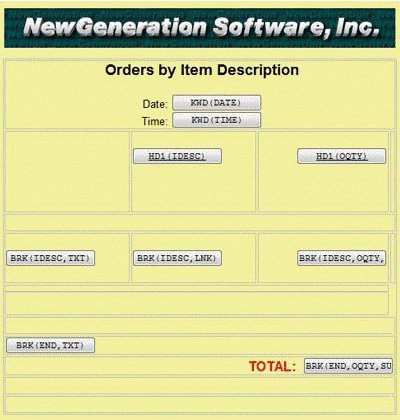
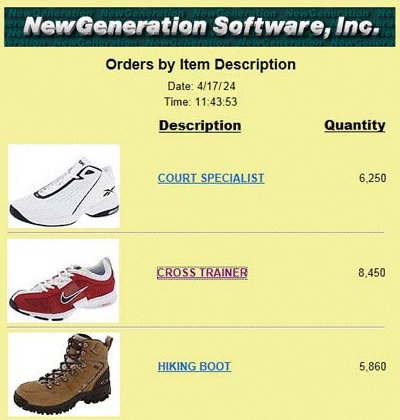
IQ Client offers extensive Web design capabilities, so users can create custom Web reports just like a Web Master, without Java, PHP, or other programming languages. You can incorporate logos, charts, graphics and other elements into a report; customize the layout; add hyperlinks; and more.
You don’t need HTML or Web page design experience as IQ Client automatically generates HTML which advanced users may edit directly if desired.
Users can securely access and run drillable Web reports from a browser, portal, or mobile device.
IQ Server users can instantly "Web-enable" existing queries. Just download and open the existing query object in IQ Client, click on the HTML tab, save, upload, and run!
How It Works
- Download Db2 file layouts or NGS-IQ queries to IQ Client. IQ Client does not transfer any actual records to your PC—just the file, field names and attributes or query objects you request.
- Write or revise your query.
- Save and upload your query to IBM i.
- Use NGS-IQ's Web, Windows, or host interfaces to run your query.
|
|
|
Security is enforced through the IBM i operating system’s object authority and IQ SeQure™, NGS-IQ’s optional security management module.
You don’t need to immediately rewrite your legacy Query/400 queries to begin gaining benefits from IQ Client and NGS-IQ. NGS-IQ's Query/400 API lets you execute Query/400 queries and use NGS-IQ features to ehhance their output.
Queries created with IQ Client can be revised and run from NGS-IQ’s Windows and 5250 user interfaces. No conversion or translation is required, and you don’t sacrifice the simplicity of the native IBM i execution environment.
About NGS
NGS is an IBM Business Partner and has been providing solutions for IBM midrange computers since 1982. NGS provides a comprehensive technical support and tutoring program for its customers and Business Partners. less
NGS-IQ, IQ Client, IQ Server, and IQ SeQure are trademarks of New Generation Software, Inc. All other trademarks are the property of their respective owners.
|