High Performance Analytics and Visualization for Operational Data
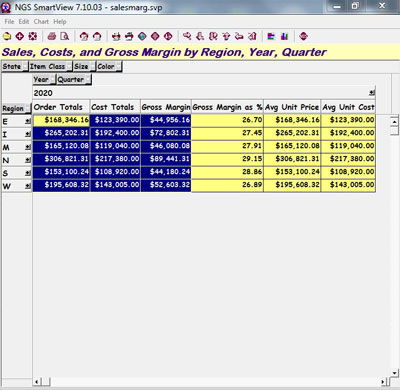
The Qport® SmartView module of NGS-IQ™ enables users to transform query output files into analytical presentations in seconds. You can study data such as budgets, sales, orders, payroll, inventory, and shipments by periods of time, companies, products, customers, vendors, and other factors. If you can think of a way you want to monitor your company's performance, and you have the data, you can visually analyze it with Qport SmartView.
Remarkably Powerful and Easy to Use
Qport SmartView enables anyone, not just IT professionals and Excel power users, to manipulate, study, pivot, chart, filter, drill into, export, and share important data without writing formulas, programs, or scripts.
It summarizes your view of your data based on how you organize the fields in your query output.
You can have any number of drill-down levels in your matrix and summarize any number of data fields by row and column at each drill-down level.
You can filter your view to isolate and contrast related business factors, calculate new values, export data sets to Excel and HTML, chart your data in a wide range of formats, and share data with other users.
Users enjoy the ease of use and flexibility of a Microsoft® Excel-style interface while using the scalability and power of IBM® i to support analytics. Instead of maintaining massive Excel workbooks with complex formulas and pivot tables, users can quickly interact with multidimensional displays of read-only data.
Due to its design, Qport SmartView can provide answers in seconds—whether you want to see sales by division and territory; product orders by quarter, month and week; shipments by distribution center; aged payables in 30, 60, and 90-day buckets; or any other type of analytical report.
You can format, pivot, filter, chart, drill into, and analyze your data in virtually unlimited ways. Your matrix can include calculated values like margins, averages, totals, percentages of totals, and other information at each drill-down level.
Integrated Data Visualization
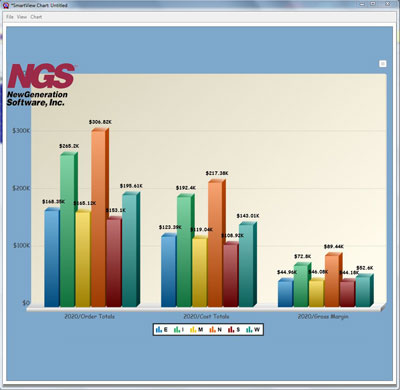
Qport SmartView allows you to design and customize charts, save charts within your matrix, and design chart templates you can share with others. Qport SmartView charts are in HTML5 format and can be exported in a wide range of popular graphic formats to use in presentations or elsewhere.
You can also select fonts, type sizes, type styles and colors, background colors, titles, numeral formats, critical value highlighting rules, and other elements to make your data easy to see and understand.
Fast Access to Real-Time Operational Data
You can refresh a SmartView matrix with new data in one click. If you like, you can password protect your matrix so other Qport SmartView users can analyze the data but not refresh the matrix or change your layout.
Qport SmartView includes a built-in zip utility so you can zip and share matrices with other Qport SmartView users via the Web or email. Even traveling or off-network users can open, study, and work with the data you want them to see. Qport SmartView is a great way to provide auditors with read-only data about users and system processes.
Complete Integration with NGS-IQ™
Qport SmartView is an integrated module of the NGS-IQ query, reporting, and analytics system. This integration means you benefit from the comprehensive database extraction, formatting, calculation, and aggregation features of NGS-IQ when transferring data to Qport SmartView. Also, you can provide your managers with easy access to your data without compromising security or performance. |
|
|
| |
What is NGS-IQ?
NGS-IQ is a comprehensive query, reporting, and analytics solution built for IBM i. It provides advanced data extraction, formatting, and presentation features.
NGS-IQ users can create and run queries using Web browsers, Windows, and IBM i 5250 interfaces.
NGS-IQ’s Qport Access module on the Windows desktop is the bridge that delivers data to Qport SmartView. Qport Access provides run-time access to NGS-IQ queries and supports the ad-hoc entry of selection criteria, calculation formulas, and output target, including Excel, Word, Microsoft Access, the Windows display, and IBM i or ASCII printers.
All NGS-IQ queries operate in accordance with your IBM i security settings. You may also develop database and report authority specifically for your NGS-IQ users with the IQ SeQure™ module. less
NGS-IQ and IQ SeQure are trademarks of New Generation Software, Inc. Qport is a registered trademark of New Generation Software, Inc. All other trademarks are the property of their respective owners.
|